![vintory Logo_web_res.png]](https://help.vintory.com/hs-fs/hubfs/vintory%20Logo_web_res.png?height=40&name=vintory%20Logo_web_res.png)
Updated: March 26, 2026
- Form Submissions via Conversations
- Form Submissions via Sites
1. Form Submissions via Conversations
Form submissions in Conversions enable users to view submitted contact details directly on the Conversations page
- To receive form submissions on the Conversations page, you must explicitly enable the setting by toggling it ON during form creation on the Form creation page.
- You can create forms by navigating to Sites > Forms > Builder
- Once enabled and a contact submits a form, a new form submission will appear in the Conversations list each time a form is submitted.
- You can view the submission details by clicking the “View Submission” button OR you can navigate to the Form Submissions page by clicking the “Check all form submissions” button.
2. Form Submissions via Sites
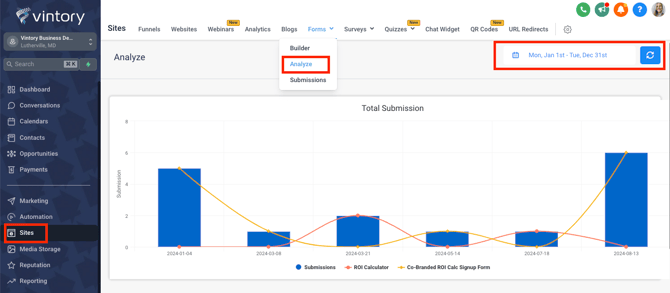
- In your account, navigate to Sites > Forms > Analyze
- You'll now see a graph showing you the performance of the various forms. (Please ensure that you adjust the dates in top right hand corner.)
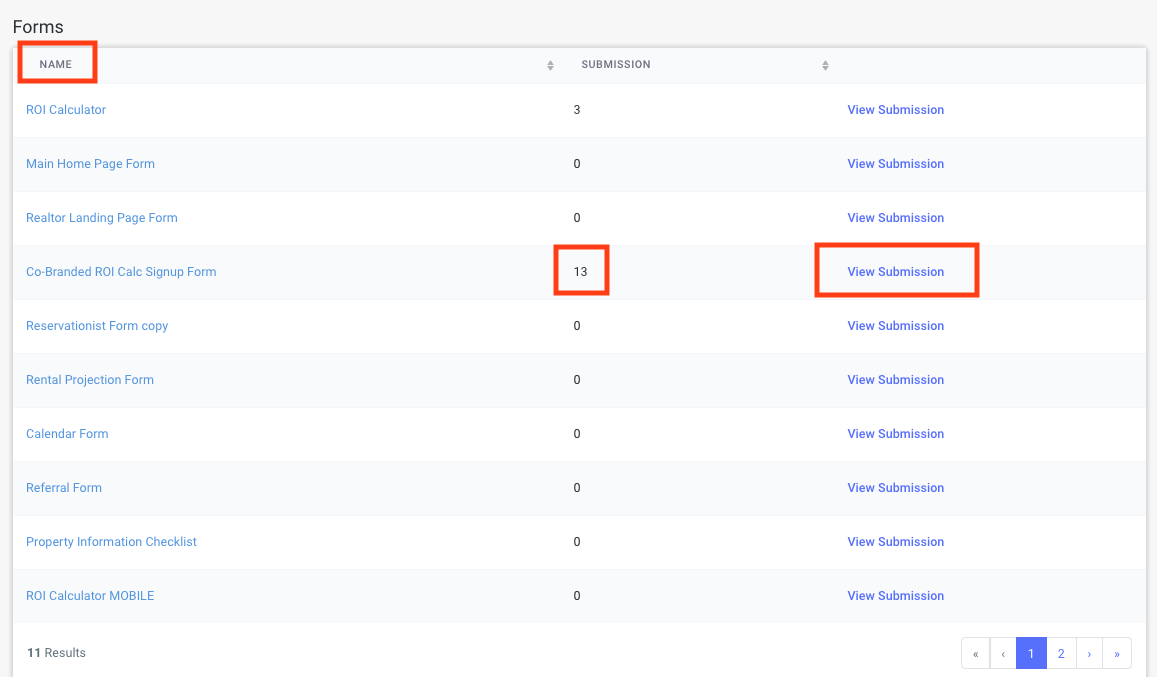
You can also view the form name, corresponding submission count, and the submissions.